Sunday, 31 July 2011

Creativity Is...

 Found Here: moonstarsandpaper (Original Artist Unknown)

"An inherent curiosity, and ability and willingness to challenge convention; to engage with ideas, make connections and draw conclusions, then intentionally think and act beyond these."

Please share your definition.

Creativity: A Gift for the Gifted.


Gifted students rarely let on that there is something missing from their learning. The creative world of their earliest years has lost its validity. They have been forced to let it go. Their sense of wonder has begun to fade.

Learning has become less about them as individuals and more about their ability to comply with a set of arbitrary expectations. These gifted learners who had an abundance of curiosity and inspiration become particularly disheartened.

While traditional extension programs focus heavily on vertical extension, they ignore the creativity that arises from lateral exploration. Creativity revives unused talents and interests, and extends the gifted learner in significant ways. Academics and creativity do not belong on separate poles. Gifted learners, when freed from artificial constraints, will pursue learning at their own level AND explore its creative edge.

It is a great tragedy that surprisingly few gifted children become creative adults. simply being intelligent does not guarantee a creative future. Over time, gifted students tend to approach their education as a means to an end.

Gifted learners need time to step back from destructive conditions and make their own contributions to what they are learning. If we can integrate creativity into the curriculum, we can awaken inside our learners their own freely creative spirit.

We need to give gifted students power over their learning. Many struggle with motivation. The creative process motivates, through its positive contribution to emotional well-being and intellectual growth, through promotion of higher order thinking.


Academics and creativity can naturally be woven together:

  1. Allow the gifted learner to delve into material head first. They will draw on a wide range of sources, pose questions and gather the data they require
  2. The gifted learner will then cast off into the depths, seeking a path of their own
  3. Often, they will discover areas where their understanding or skills fall short
  4. They will return with new questions and new problems
  5. The process will continue
 
Above is my response to the first chapter of "Igniting Creativity in Gifted Learners, K - 6"; entitled Creatvity: a Gift for the Gifted.

Thursday, 14 July 2011

Managing Information Overload

I think most of us have trouble with information overload at some point - and I was having the problem regularly! My biggest issue was organsing the information I found.

I am fairly new to the world of Twitter, but have found it a sensational way to stay at the cutting edge of education. I think I've learnt more from Twitter in the last few months than in all the PD I have done since starting teaching! I love that it allows me to jump in and jump out whenever I have a few free minutes.

One problem I have found however, is that the information comes thick and fast, and sometimes it can be very hard to keep up over the course of a busy day. Tools, articles, blog posts, new ideas and strategies - I may spot something that looks fantastic, but if I only have a couple of minutes, whatever amazing tidbit someone had shared would likely disappear. I have made use of a few tools that make my Twitter life much easier.

1. I connect all my devices to my Twitter account. Simple! iPhone, iPad, Laptop, Desktop. No matter where I am, if I have a couple of minutes, I can jump on and see what's happening. Twitter is PD on demand.

2. Read It Later This is an amazing little tool! I have the free read it later app on my iDevices, and have installed the plugin for Firefox. Basically this allows you, with one or two clicks, to save those websites that you come across, that you don't have time to process immediately, to a 'reading list' for a later time. I have a button in my links bar that goes straight to my reading list (http://readitlaterlist.com/unread). Twitter for iOS is fully integrated with Read It Later and has a two-tap saving process. The firefox plugin is even better, and has a small arrow embedded into the URL bar that will save any link for later with a single click. The free iOS app seems to be limited to around 4 pages of links, but that is a good cue that it's time to set aside 30 minutes to process it all. (I just open each link in a new tab and go from there).

3. Diigo I could just bookmark my links, but then I would end up with a massive list of bookmarks, with no organisation at all. Enter Diigo. I've only been using this for a couple of weeks, and there are people who are more expert than I, but it is easy to use, and means your organised list is available anywhere. My main advice for those starting out is to tag everything! A toolbar is also available, which has incredible functionality. I now have a small, but growing list of educational resources that I have reviewed (this is important) and can go back to at any time. There is a whole other side to Diigo, which is the social bookmarking aspect, but I will go into that more at a later date. For now, any static websites or web 2.0 tools that I come across get saved in my Diigo list. Blogs that I discover go to Google Reader.

4. Google Reader and oldie but a goody. Although I've been using Google Reader for years, I hadn't subscribed to any educational blogs until very recently. I had subscribed to numerous personal and humour blogs, and didn't really want to be faced with 'work' every time I wanted to do some recreational reading (or... ahem... laugh at photos of cats). Then I discovered folders! If you scroll right to the bottom of your subscription list you will see a tiny blue link to 'manage subscriptions'


This takes you to a new screen, on which you can sort out all of your subscriptions.  Now I have folders for Teaching, Interest, Photography and Humour. Depending on what I feel like reading, I can click on the relevant folder and have only the posts from those blogs show up. Of course I also have a reader app on my iDevices. Another nifty Reader tool that not many know about is the bookmarklet (IE & Firefox - and probably Chrome). This is a little button that sits in my links bar that I can click on any time I find a blog I want to follow. It will redirect you to Reader, where you can click once more to subscribe. Get it here.


These four simple tools make it much easier to stay in control of the constant flow of information!

Friday, 1 July 2011

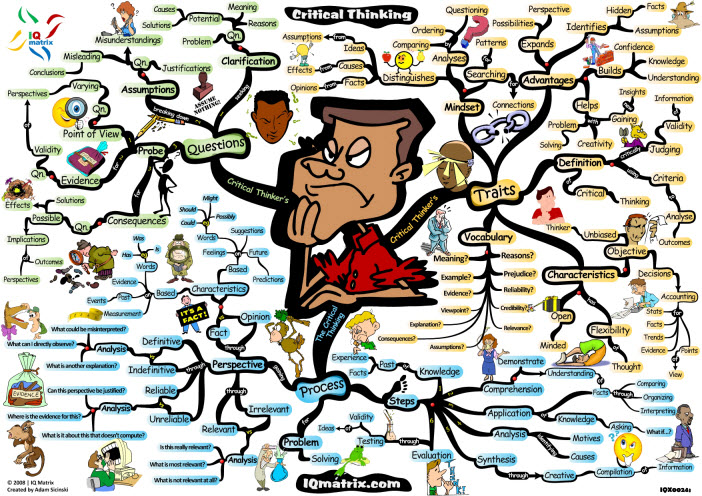
An Amazing Mind Map


Click to embiggen :)

Created by Adam Sicinski http://iqmatrix.com/

I want to plaster my classroom walls with these posters!

Wednesday, 29 June 2011

Four ways to explicitly teach critical thinking

Teach about brain function

Students should learn how the brain works.
  • How do we think?
  • How does memory work?
  • What causes emotions?
  • Why do we dream?
  • How do we learn?
  • How/Why do mental disorders occur?
  • What happens when part of the brain is damaged?
Teach Metacognition

Encourage students to be conscious of their own thinking during problem solving.
  • Have discussions about what is going on in their heads
  • Compare different approaches
  • Identify what is known, what needs to be known, how to produce that knowledge
  • Think aloud
  • Teach students how to learn, how to study for a test, how to ask effective questions
  • Help students discover their learning style, and teach them how to tackle learning that is outside of their preferred style
Share Great Thinkers

 Expose students to role models who solve problems well, particularly those who have left a mark on society.
  • Noteworthy scientists, artists and historians: Einstein, Van Gogh, Mozart, Da Vinci, Gandhi, Newton, Currie, Pasteur, Franklin, Edison.
  • Those upon whom they depend: mechanics for their efficient and precise ways of repairing cars, parents for their ability to deal with irrationality by withholding impulsivity, entrepeneurs for their creative ability to offer innovative products and services and teachers, for their ability to plan, monitor and evaluate
  • Apply critical thinking to everyday life: How would a critical thinker go to the supermarket? What about an ineffective thinker? How would a critical thinker read a newspaper? Choose a dentist? Buy a car? Do homework? Vote?
Study the thinking of varying disciplines

Study and compare the thinking methods of artists, scientists, scholars. Examine the differential processes of investigation, inquiry and creativity.
  •  How does what scientists do differ from what artists do?
  • What are the processes by which scientific truths are discovered and proven?
  • What are the processes of inquiry used by anthropologists as they live with and study a culture?
  • What goes on in a maestro's mind when they conduct an orchestra?
  • How was Mozart able to 'hear' a total musical composition before writing it down?
  • What is the process by which poets create?
  • Why can't scientific inquiry be used to solve social problems?
Further Reading: Arthur L Costa, California State University, Sacramento

Tuesday, 28 June 2011

Creating School and Classroom Conditions for Critical Thinking

Having discussed what critical thinking actually is, below are some strategies for fostering creative thought in students.

To create an environment that fosters Critical Thinking, teachers should:
  1. Pose problems, raise questions, intervene with not-easily-solved paradoxes, dichotomies, controversies, dilemmas, discrepancies. Challenge students' intellect, tease their imagination
  2. Organise the classroom for cooperative interaction and collaborative problem solving
  3. Structure the school environment for thinking - value it, make time for it, secure materials to support it. Ensure curriculum, reports, rules, discipline, values and mottoes promote and are consistent with thoughtful action.
  4. Encourage the whole community to model the behaviours of critical thinking, throughout the students' environment.
  5. Respond to students and each others' ideas, so as to maintain a climate of trust and risk-taking. Make learning experimental, creative and positive. Listen, probe. Remain non-judgmental. Use rich data sources.
  6. Ensure content and instructional strategies are developmentally appropriate. Begin new learning with real material and objects, regardless of age group.

Reference: Costa (2003) Communities for Developing Inquiring Minds.

Filter the Filth? How about teaching the ethics?

The Age's Letter to the editor (Filter the Filth, 27th June 2011) called for schools and the education department to "do all within their power to prevent further students from being corrupted" via the school provided netbooks. Background: In 2009 it was decided that every student in years 9-12 would have a laptop provided for free (government funded). The success of this implementation (or lack thereof) is beyond the scope of this post, however it would appear that some students have been accessing inappropriate content outside of school hours using the netbooks. Surprise surprise. The individual in the article above was outraged that filtering software was not installed on the laptop.

Do parents honestly still expect content filtering to absolve them of any responsibility regarding their childrens' online actions? I work in a school that uses the state-provided internet access, which is heavily filtered. I am sure noone would be surprised to learn that 'inappropriate' content has been accessed within the school from time to time. If I felt so inclined, I could probably access similar content very easily within a matter of seconds. These so-called "filters" are very easy to circumvent.

Surely we would have wider ranging success if, as schools and as families, we help our children to understand the ethics of their online actions, and the short and long term effects of the digital footprint they are creating every day. I believe some schools are already doing an excellent job of this. Of course nobody expects parents to be able to "watch a child 24 hours a day", but having filtering software installed is not going to be the 'big brother' that some expect it to be.